

What is a good LinkedIn Engagement Rate?
You publish consistently on LinkedIn. Your posts look professional, your ideas are useful, and you're putting time into building your brand. But when you check your analytics, one question keeps coming up: Is my engagement rate actually good?
It's a fair question, especially if you're a small business owner, entrepreneur, CEO, or marketing professional trying to turn LinkedIn activity into meaningful business results.
The challenge is that engagement rates can vary considerably depending on your industry, audience, content format, and calculation method. A 3% engagement rate might be a respectable result for one account, while another could consistently achieve much higher numbers.
So, what should you aim for?
At designACE, we believe LinkedIn analytics should help you make better decisions, not leave you comparing numbers without context. In this guide, we'll explain what counts as a good LinkedIn engagement rate, how to calculate yours, what current benchmarks tell us, and how to use your results to improve your LinkedIn strategy.
What Is a Good Engagement Rate on LinkedIn?

Start With a Clear LinkedIn Goal
As a general starting point, an engagement rate of 3% to 5% is a reasonable benchmark for LinkedIn content, although results vary by industry, audience, account type, and calculation method. Recent research from Sprout Social and Socialinsider offers useful context for evaluating your performance.
Socialinsider's 2026 benchmark report, based on 1.3 million LinkedIn posts from 16,645 business pages active between January 2024 and December 2025, reports an average engagement rate by impressions of approximately 5.2%. Its analysis also shows that native document posts, including PDF carousels, can perform particularly well.
However, don't treat 5.2% as a universal target. Benchmark studies can use different samples, time periods, and definitions of engagement. Your results will also depend on whether you're measuring a personal profile or a company page.
How should you interpret your engagement rate?
Here is a practical framework for assessing engagement by impressions. Use it as a starting point rather than an official industry-wide ranking.
Below 2% — Room to Grow: Review your content relevance, opening lines, audience targeting, and distribution.
2%–4% — Building Momentum: Your content is generating interaction, with opportunities to improve consistency and relevance.
4%–5% — Strong Engagement: Your posts are encouraging meaningful interaction relative to their impressions.
Above 5% — Excellent Engagement: Your content is performing strongly against this general benchmark, although audience quality and business outcomes still matter.
These ranges are an illustrative guide, not a guarantee of success or a universal industry standard. They also reflect the type of performance framework you can use when reviewing your own content; they should not be confused with the methodology used by any individual benchmark report.
Why a higher rate isn't always better
Imagine two consultants. One receives a 7% engagement rate from a small group of relevant business decision-makers. The other receives 3% from a much larger audience that rarely needs their services.
The second consultant could still generate more qualified leads, depending on the number and relevance of their interactions.
Therefore, your goal shouldn't simply be to achieve the highest possible percentage. Instead, focus on attracting the right audience, encouraging meaningful conversations, and building the credibility that supports your business goals.
How to Calculate Your LinkedIn Engagement Rate

Optimise Your LinkedIn Headline to Earn More Profile Clicks
Before comparing your results with industry benchmarks, make sure you're using the correct formula. Different tools calculate engagement rates using different denominators, which can produce significantly different percentages for the same post.
The engagement rate by impressions formula
A widely used formula for LinkedIn engagement rate is:
Rate = ( Total Engagement Impressions ) × 100
Total engagements may include reactions, comments, reposts, and clicks. Depending on the reporting tool and metric definition, saves, sends, and other actions may also be included. Always check what your analytics source counts as an engagement.
Impressions represent the number of times your content appeared on users' screens. The same person can generate multiple impressions by seeing your post more than once.
For example, suppose one of your LinkedIn posts receives:
2,000 impressions
60 reactions
15 comments
10 reposts
15 clicks
Your total engagements are 100.
Engagement rate = (100 ÷ 2,000) × 100 = 5%
This means your post generated 100 recorded interactions from 2,000 impressions, giving it a 5% engagement rate under this formula.
Why calculation methods matter
Engagement rate by impressions measures interactions against content exposure. Engagement rate by followers, meanwhile, measures interactions against your total follower count.
These methods answer different questions. Impressions help you assess how people respond when your content appears in their feeds. Follower-based calculations can be useful when comparing accounts or reviewing performance using a consistent audience-size denominator.
For meaningful comparisons, use the same formula across the posts and reporting periods you're evaluating. Avoid comparing your impression-based rate with a competitor's follower-based rate as though the two figures were equivalent.
Calculate yours without the manual math
If you'd rather focus on improving your content than working through the numbers, try the designACE LinkedIn Engagement Calculator.
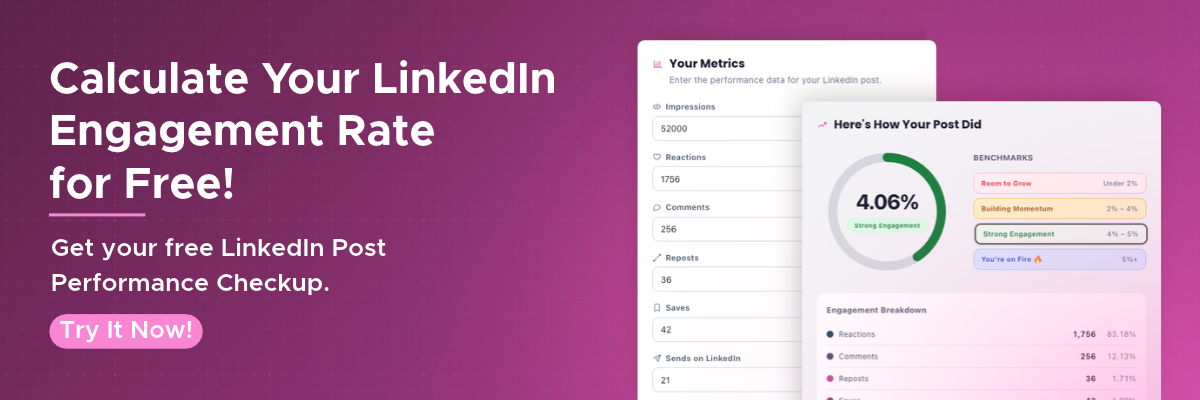
Enter your post metrics to assess performance and identify opportunities to improve. You can also use the results as a starting point for thinking about your content objectives, audience, and next steps.
What Influences Your LinkedIn Engagement Rate?

Design a LinkedIn Banner That Reinforces Your Brand
Your engagement rate isn't determined by a single factor. It reflects how your audience responds to your content, how widely the content is distributed, and whether the people seeing it find it relevant.
Understanding these factors helps you make better decisions than simply posting more often.
Your content format and topic
Different formats encourage different types of interaction. Text posts can invite discussion, while document carousels can help you explain a process or share a series of practical tips. Videos can communicate ideas through demonstrations, interviews, or personal stories.
Socialinsider's research highlights native documents as a strong-performing LinkedIn format. However, that doesn't mean every business should publish carousels exclusively. The best format depends on your audience, message, and objective.
For example, a consultant might use a carousel to break down a complex process, a text post to share a professional lesson, and a short video to explain a common customer challenge.
The topic matters just as much. Posts that address your audience's real questions, frustrations, and goals are more likely to encourage relevant responses than generic updates.
Your opening line and call to action
Your first few lines should give readers a reason to stop scrolling. A specific question, surprising observation, or relatable problem can make your content more compelling.
Compare these two openings:
"Here are some tips for improving your LinkedIn profile."
"Your LinkedIn profile might be attracting views but still losing potential clients. Here's what to check."
The second version identifies a specific problem and promises a useful explanation.
Likewise, a thoughtful call to action can encourage readers to contribute their experiences. Instead of ending with "Thoughts?", ask a more focused question, such as "Which part of LinkedIn content creation takes the most time for your team?"
Your audience and posting consistency
Your LinkedIn network should include people who have a genuine reason to care about your expertise. If you're targeting business owners but most of your audience consists of people outside your market, your engagement might not translate into relevant opportunities.
Consistency also gives you more opportunities to learn what resonates. However, publishing every day isn't automatically better than publishing less frequently with a clear purpose.
Review your audience, content topics, and posting schedule together. That way, you can identify whether changes in performance relate to your message, format, timing, or audience.
How to Improve Your LinkedIn Engagement Rate
Choose a Professional LinkedIn Profile Photo
Once you understand your current performance, use your analytics to guide your next steps. Improving engagement isn't about chasing every trend; it's about developing a repeatable approach that helps you create content your audience values.
Optimize your LinkedIn Profile and content strategy
Your LinkedIn Profile shapes the impression people form when they discover your content. Make sure your headline, About section, banner, and Featured section clearly communicate your expertise and the value you offer.
Effective LinkedIn Optimization helps align your profile with your content. If you regularly discuss marketing challenges for small businesses, for example, your profile should make that expertise clear.
For professionals who need a more strategic refresh, LinkedInMakeover.ca offers support in strengthening professional positioning and profile presentation.
Next, build your LinkedIn Content around a few relevant themes. These might include educational tips, industry insights, lessons from experience, and examples of your work.
A focused content strategy helps your audience understand what you stand for and gives you a clearer way to evaluate which topics perform well.
Encourage meaningful conversations
Engagement involves more than collecting reactions. Comments, reposts, clicks, saves, and sends can each provide useful signals about how people interact with your content, depending on the metrics available to you.
To encourage more meaningful interaction:
Share practical advice your audience can apply.
Use examples and stories to make complex ideas easier to understand.
Ask specific questions that invite relevant responses.
Respond thoughtfully to comments and continue useful discussions.
Participate in conversations started by people in your LinkedIn network.
For example, a business leader could share a lesson from a recent project and invite other leaders to discuss how they approach a similar challenge. This creates an opportunity for professional exchange rather than a one-way announcement.
Experiment, review, and refine
Test different formats, topics, hooks, and calls to action over a reasonable period. Then compare performance using a consistent formula.
Don't judge your entire strategy by one unusually successful or disappointing post. Look for patterns across multiple posts to determine which approaches repeatedly attract the right audience.
For more ideas, explore how to increase LinkedIn engagement for small businesses and how to boost LinkedIn engagement and visibility.
Turn LinkedIn Engagement Into Business Results

Turn LinkedIn Engagement Into Business Results
Strong engagement can help increase your LinkedIn visibility, but it doesn't automatically generate leads or revenue. A post might receive hundreds of reactions without attracting a single qualified prospect, while a smaller post could start a valuable conversation with a potential customer.
The difference lies in how well your content supports your business objectives.
Connect engagement metrics to your goals
Start by identifying what you want your LinkedIn activity to accomplish. Your priorities might include building brand awareness, establishing thought leadership, generating leads, booking meetings, or promoting a service.
Then evaluate the metrics that align with those objectives.
| Business objective | Metrics to monitor |
|---|---|
| Build awareness | Impressions, relevant profile views, audience growth |
| Encourage discussion | Comments, reposts, meaningful replies |
| Share useful resources | Clicks, saves, sends, where available |
| Generate leads | Qualified inquiries, discovery calls, lead conversions |
| Support sales | Qualified opportunities, proposals, attributable revenue |
These metrics work together. Engagement can show whether your content resonates, while lead and sales data help you assess whether that attention contributes to business growth.
Use engagement insights to strengthen your LinkedIn campaign
If educational posts consistently attract thoughtful comments from your target audience, consider developing a related content series. If case studies generate relevant inquiries, create more content that demonstrates your process and results.
Likewise, if your content receives impressions but few meaningful interactions, revisit the relevance of your topics, the clarity of your message, and the audience you're trying to reach.
For entrepreneurs and executives with limited time, LinkedIn management services can help coordinate content planning, publishing, and performance reviews. A structured approach makes it easier to identify opportunities without relying on guesswork.
Ultimately, your LinkedIn strategies should connect content performance with the outcomes that matter to your business. Engagement is a useful indicator, but its real value comes from what you learn and how you act on it.
Quick Tips: Your LinkedIn Engagement Checklist
Use this checklist when reviewing your next batch of posts.
Calculate engagement using a consistent formula.
Compare your results with relevant industry benchmarks.
Review which topics and formats generate meaningful interaction.
Strengthen your opening lines and calls to action.
Respond to comments and participate in relevant discussions.
Track qualified leads and business outcomes alongside engagement.
Review performance monthly and adjust your strategy based on the results.
Conclusion(or Final Thoughts): [add context]
A good LinkedIn engagement rate is more than a percentage. It's an indicator of how effectively your content connects with your audience, encourages interaction, and supports your professional or business goals.
Start by calculating your rate consistently, comparing it with relevant benchmarks, and identifying which topics and formats resonate with your audience. Then use those insights to improve your content, strengthen your LinkedIn visibility, and create more opportunities for meaningful conversations.
If you'd like a clearer picture of your current performance, try the designACE LinkedIn Engagement Calculator. It's a practical starting point for understanding your results and identifying what to improve next.
For additional support, explore our LinkedIn management services, LinkedIn training, or LinkedIn campaign services.
The goal isn't to chase an arbitrary number. It's to build a LinkedIn presence that attracts the right people, earns their trust, and contributes to meaningful business growth.
Frequently Asked Questions (FAQs)
-
Engagement can provide signals about how people respond to your content, but it doesn't guarantee greater distribution. LinkedIn's feed uses multiple signals to determine relevance and distribution. Focus on creating useful, relevant content rather than trying to manipulate engagement.
-
There isn't one ideal posting frequency for every account. Start with a schedule you can maintain consistently, such as two or three quality posts per week, and adjust based on your audience, available resources, and results. Prioritize relevance and consistency over publishing simply to meet a quota.
-
You can review both, but interpret the results in context. Personal profiles and company pages often serve different purposes, attract different audiences, and use different content approaches. Compare similar account types and content objectives wherever possible, and keep your calculation method consistent.
-
Yes. A post might receive relatively few interactions but attract a highly relevant decision-maker, generate a qualified inquiry, or lead someone to explore your services. Evaluate engagement alongside your business objectives rather than treating the percentage as the sole measure of success.
-
A monthly review is a useful starting point for many small businesses and professionals. It provides enough time to identify patterns across multiple posts without overreacting to individual results. For active campaigns, you may also review performance weekly to identify opportunities for timely adjustments.
Useful Blogs

LEVEL UP YOUR LINKEDIN PROFILE
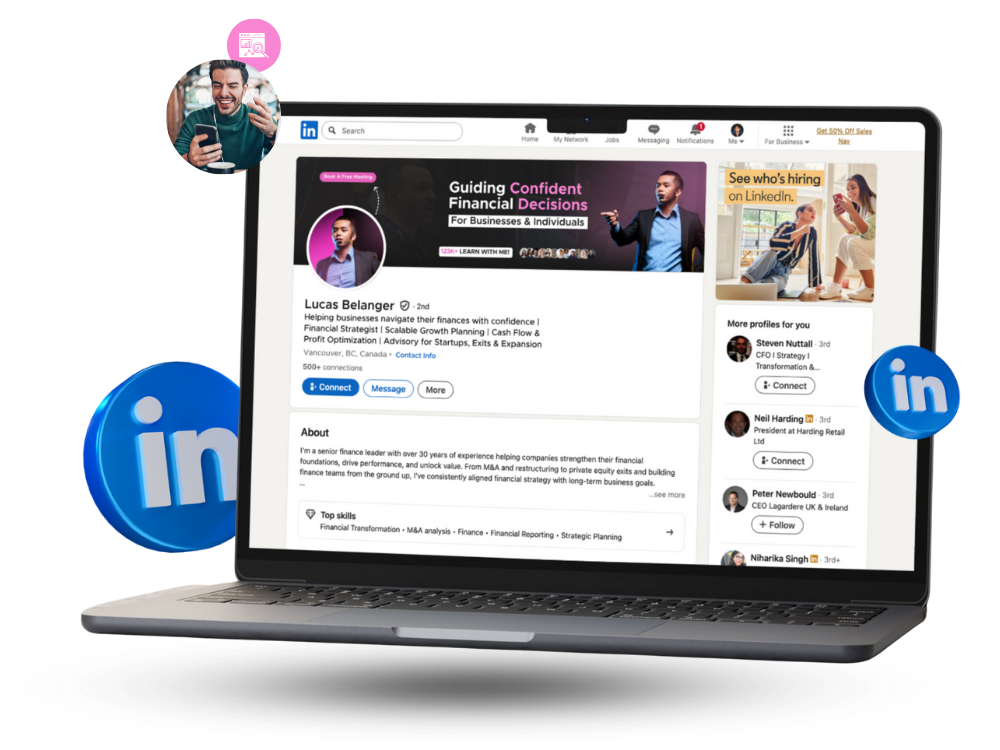
Enhance your LinkedIn presence and attract more opportunities with a profile designed to stand out.
PICK YOUR MAKEOVER
Learn what makes a good LinkedIn engagement rate, learn how to calculate yours, explore current benchmarks, and find practical strategies to improve engagement and support business growth.