

LinkedIn Engagement Rate Calculator
Get your free LinkedIn Post Performance Checkup.
This calculator helps you look a little deeper. Enter the analytics from one of your LinkedIn posts to calculate your engagement rate, see how your post is performing, and get practical ideas for what to try next.
Let's Check Your LinkedIn Post
Open your LinkedIn page and click on “analytics”. Scroll to the “Top Performing Posts” section and click “view analytics” beside the post you want to check. Type in the numbers shown.
Your Metrics
Enter the performance data for your LinkedIn post.
Here's How Your Post Did
Tell Us About Your Post
A little more context helps us make your results more meaningful.
Get personalized recommendations based on your current engagement and learn how to turn your LinkedIn content into stronger visibility and opportunities.
How to Understand Your LinkedIn Engagement Rate
Your LinkedIn engagement rate helps you understand how people respond to your content. It measures the percentage of impressions that lead to interactions, such as reactions, comments, reposts, saves, and sends.
However, reach is only part of the story. Knowing how many people saw your post is useful, but understanding how your audience engaged with it can help you make more informed decisions about your LinkedIn content strategy.
How Is LinkedIn Engagement Rate Calculated?
LinkedIn engagement rate is simply calculated by dividing total engagements (reactions, comments, reposts, saves, and sends) by total impressions, then multiplying the result by 100.
Your total engagements include reactions, comments, reposts, saves, and sends. The result gives you a percentage that helps you assess how your post performed relative to its reach.
Why Your LinkedIn Engagement Rate Matters?
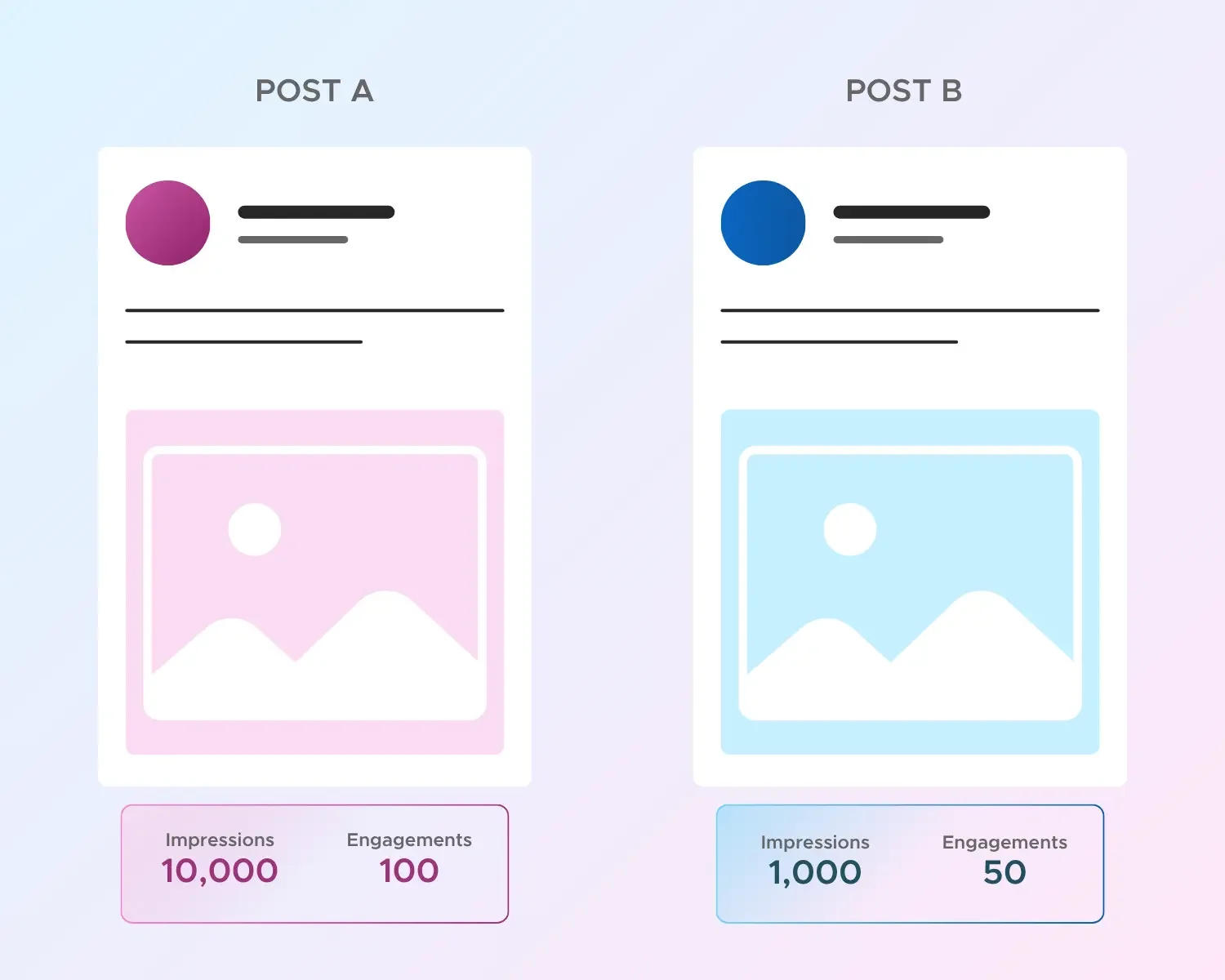
Imagine two posts:
Post A: 10,000 impressions and 100 engagements = 1% engagement rate.
Post B: 1,000 impressions and 50 engagements = 5% engagement rate.
Post A reached more people, while Post B generated more engagements relative to its impressions. This comparison highlights why looking beyond impressions can help you understand how your content resonates with your audience.
What Is a Good LinkedIn Engagement Rate?
A good LinkedIn engagement rate isn't a one-size-fits-all number. While 2%–5% is often used as a general reference range for impression-based LinkedIn engagement, what counts as a good rate depends on several factors, including your audience size, industry, content format, and the goals behind your post.
Think of 2%–5% as a helpful benchmark, not a fixed standard for success. A rate within this range can provide a useful reference point, but it doesn't automatically mean your content is performing well or poorly.
For example, a personal brand with a highly engaged niche audience may see different results from a large company page reaching a broader audience. Content format and industry can also influence engagement patterns, so comparing your results with relevant accounts and your own performance over time provides better context.
Find Your Own Benchmark
Start tracking your own LinkedIn post performance over time. Compare similar posts, look for patterns in your strongest engagement signals, and use those insights to set realistic goals.
Your benchmark should help you learn, not limit your potential.
What does Your LinkedIn Engagement Score or Rating Mean?
Your engagement rate gives you a quick look at how your audience responds to your LinkedIn content. Each rating helps you understand your post's performance, identify meaningful engagement signals, and discover opportunities to improve your content strategy.
Room to Grow
Your post reached people, but interactions are still limited. It's a chance to refine your hook, strengthen your content, and give your audience more reasons to engage.
Building Momentum
You're getting people to interact, and that's a good start! Keep experimenting with your content, testing different hooks, and learning what resonates with your audience.
Strong Engagement
Your content is encouraging meaningful interaction relative to its reach. Keep building on what's working, and look for ways to turn engagement into conversations and opportunities.
You're On Fire 🔥
Your post is generating strong engagement relative to its impressions. Take a closer look at what made it connect, then use those insights to inform your next content strategy.
Your Results & Recommendations
We'll highlight your strongest engagement signal, biggest opportunity, and post type to help you understand what your numbers might mean. You'll also receive three practical recommendations based on your score, engagement mix, and content goals, so you can turn your LinkedIn analytics into your next strategic move.
Factors Affecting Your LinkedIn Engagement Rate
Your LinkedIn engagement rate isn't shaped by one number alone. From the type of content you publish to when you post and who you're reaching, several factors influence how your audience responds.
A lower engagement rate doesn't always mean your content is underperforming. Understanding the bigger picture helps you make smarter content decisions, rather than chasing numbers without context.
Type of LinkedIn Post
Text posts, carousels, videos, polls, and personal stories can encourage different types of engagement. Some formats may generate more comments, while others encourage saves or reposts.
Your Opening Hook
Your opening line is your chance to earn attention before someone clicks "see more." A generic or unclear introduction can make it harder for your audience to engage with the rest of your post.
Content Relevance and Value
Content that speaks directly to your audience's interests, challenges, and needs is more likely to encourage meaningful interaction. Broad topics may not connect as strongly as specific, audience-focused insights.
Time of Posting
When you publish can influence who is online and available to interact with your post. However, there isn't one universally perfect posting time for every audience or industry.
Industry Benchmarks
A "good" LinkedIn engagement rate can vary depending on your industry, content type, audience, and how engagement is calculated. Comparing your results with an unrelated benchmark may not give you an accurate picture of your performance.
Audience Size and Quality
As your audience grows, your engagement rate may change. A larger audience doesn't guarantee that every person who sees your content is interested in what you share.
Your follower count, connection quality, and relevance of your audience all provide important context when interpreting engagement.
Posting Consistency
Posting too infrequently can limit opportunities to connect with your audience, while publishing too often without a clear strategy may lead to audience fatigue.
Consistency isn't about posting as much as possible. It's about showing up with content that serves a purpose.
Your Call to Action
Posts that don't give people a clear way to respond may miss opportunities to encourage conversation. A thoughtful question or relevant invitation can help your audience know how to participate.
How to Improve Your LinkedIn Engagement Rate
Want to get more from your LinkedIn content? Small changes to your hooks, post structure, timing, and engagement habits can help you create content that connects with the right audience.
The secret isn't posting more. It's creating with intention, learning from your results, and refining what works. Try these practical tips to strengthen your LinkedIn engagement strategy.
Hook Your Audience in the First Line
Your opening is your chance to earn attention. Start with a bold statement, specific insight, surprising fact, or thought-provoking question that makes people want to read more.
Test When Your Audience Is Active
Timing can influence who sees and interacts with your post early on. Use your LinkedIn analytics to identify audience activity, then test different posting times to find patterns that work for you.
Ask Questions That Spark Conversation
Make it easy for your audience to join the discussion. End your post with a specific, relevant question that invites people to share their experiences, perspectives, or ideas.
Keep the Conversation Going
Respond to comments with thoughtful replies, especially soon after publishing when possible. Meaningful follow-ups help nurture conversations and give your audience a reason to engage again.
Choose the Right Format for Your Message
Use document carousels to break down complex insights, frameworks, or step-by-step processes. Keep your content easy to scan with short paragraphs, clear structure, and plenty of breathing room.
Share Personal Stories and Test Your Content Pillars
Real experiences, lessons, and relatable insights can help your content feel more authentic. Experiment with different topics, track engagement over time, and focus on the content pillars that connect with your audience and support your goals.
Let's Build Meaningful Connections That Drive Growth
Your LinkedIn presence should do more than attract attention—it should create conversations, build trust, and support long-term business growth. Let's create a strategy that's tailored to your goals.
Frequently Asked Questions
-
Yes! LinkedIn provides engagement rate data in post analytics, alongside metrics such as impressions, reactions, comments, and reposts. The exact metrics available can vary by account type and analytics view. You can use LinkedIn's native data to review individual posts and track performance over time.
-
Not necessarily. Article views measure people viewing your article, while engagement measures interactions with your content. They answer different questions, so it's helpful to track article views separately from your post engagement rate when evaluating content performance. Check the specific analytics definition for the content type you're reviewing.
-
Not always. A post with low engagement can still offer useful insights about your topic, message, or audience. Before deleting it, consider what you can learn from the results and whether the content serves a purpose beyond immediate engagement. Use your performance history to guide decisions rather than treating one low-performing post as a failure.
-
There's no universal impressions target that applies to every LinkedIn account. Your results depend on factors such as audience size, content, account type, and distribution. Instead of chasing a fixed number, track your average impressions over time and compare similar posts. A post's reach becomes more meaningful when considered alongside engagement and your goals.
-
It depends on your content, audience, and objective. A post designed to drive website visits should be evaluated differently from one focused on conversation or brand awareness. Rather than relying on one universal CTR benchmark, compare your results with relevant campaigns or past posts that share a similar goal. LinkedIn also provides click-related analytics for applicable content.
-
There's no single growth rate that guarantees a healthy LinkedIn presence. The value of new followers depends on their relevance to your goals, the quality of your audience, and whether your network is developing in the right direction. Track follower growth over time, but look beyond the number to understand who you're attracting and how they engage with your content. LinkedIn provides follower growth trends through audience analytics.
-
Give your post enough time to gather meaningful data before drawing conclusions. The right review window depends on your audience, posting activity, and how quickly your content receives impressions and interactions. Consider reviewing early results, then checking performance again as more data becomes available. For more reliable comparisons, use a consistent review window across similar posts.