
How to Optimize Your LinkedIn Profile for Business Growth: A Complete Guide for Small Businesses
Your LinkedIn profile is often the first interaction potential clients, partners, employers, and collaborators have with your business. Long before a conversation begins, people are already evaluating your credibility, expertise, and whether you're someone they want to work with. That's why optimizing your LinkedIn profile isn't just about looking professional; it's about creating opportunities for business growth.
A well-optimized LinkedIn profile does far more than list your experience. It helps communicate your value, improve your visibility in LinkedIn search results, and build trust with the people you want to reach. Whether your goal is attracting new clients, growing your professional network, generating referrals, or positioning yourself as a thought leader, every section of your profile contributes to that first impression.
What You’ll Learn
In this guide, you'll learn how to optimize the key elements of your LinkedIn profile—from your headline and banner to your profile photo, About section, and featured content. We'll also explore practical strategies to help your profile stand out, support your business goals, and turn profile visits into meaningful professional opportunities.
Start With a Clear LinkedIn Goal

Start With a Clear LinkedIn Goal
Before you update your headline or rewrite your About section, take a step back and ask yourself one question: What do I want my LinkedIn profile to accomplish?
Your answer will influence almost every decision you make during the optimization process. Someone looking to establish thought leadership will present themselves differently than someone seeking new clients, while a founder focused on partnerships may emphasise different strengths than someone growing their professional network.
Some of the most common goals for business owners and professionals include building credibility within their industry, generating qualified leads, expanding their network, or positioning themselves as a trusted expert. None of these goals are better than the others, but each requires a profile that supports that specific outcome.
For example, if your goal is to attract clients, your profile should clearly communicate who you help, the problems you solve, and why someone should choose to work with you. If your objective is to become recognized as a thought leader, your profile should highlight your expertise, industry experience, and unique perspective.
When your goal is clear, every part of your LinkedIn profile becomes more intentional. Your headline, banner, About section, featured content, and even the keywords you use should all reinforce the same message. That consistency not only helps visitors understand who you are, but also makes it easier for LinkedIn to surface your profile to the right audience. Your goal will also help you shape and strategise your LinkedIn content.
If you'd prefer a done-for-you LinkedIn profile makeover that's strategically written and optimized for your industry, niche, and professional goals, LinkedInMakeover.ca(powered by designACE) can help you build a profile that strengthens your positioning, improves your visibility, and creates stronger first impressions. Rather than simply rewriting your profile, we focus on clarifying your message, showcasing your unique value, and aligning every section to support the opportunities you want to attract.
You can always start for free, use our free LinkedIn Playbook Series 1: Profile Power-Up as a starting point. It has a complete guide on how to optimize and create a LinkedIn profile that attracts opportunities.
Optimize Your LinkedIn Headline to Earn More Profile Clicks

Optimise Your LinkedIn Headline to Earn More Profile Clicks
Your LinkedIn headline is one of the most influential pieces of your profile. It appears in search results, connection requests, comments, messages, and profile previews, often becoming the first piece of information someone reads about you. A well-written headline can encourage someone to click on your profile, while a generic one can cause them to keep scrolling.
Think of your headline as a concise introduction to your professional brand. It should communicate what you do, who you help, and what differentiates you from others in your field. A compelling headline creates curiosity, reinforces credibility, and gives visitors a reason to learn more about you.
Build a Value-Driven Headline
The strongest headlines combine three key elements: relevant keywords, a clear value proposition, and a point of differentiation. Rather than simply stating your role, explain the impact you create. Think about the problems you solve, the audience you serve, or the outcomes you help people achieve.
For example, "Marketing Manager" tells people what you do. A headline such as "Helping small businesses grow through strategic content marketing and brand storytelling" provides far more context while still incorporating relevant keywords naturally.
Writing a good headline with value will also help your profile appear in LinkedIn search results, which will further expand your reach and connect with relevant leads.
A Simple Framework for Writing a Better Headline
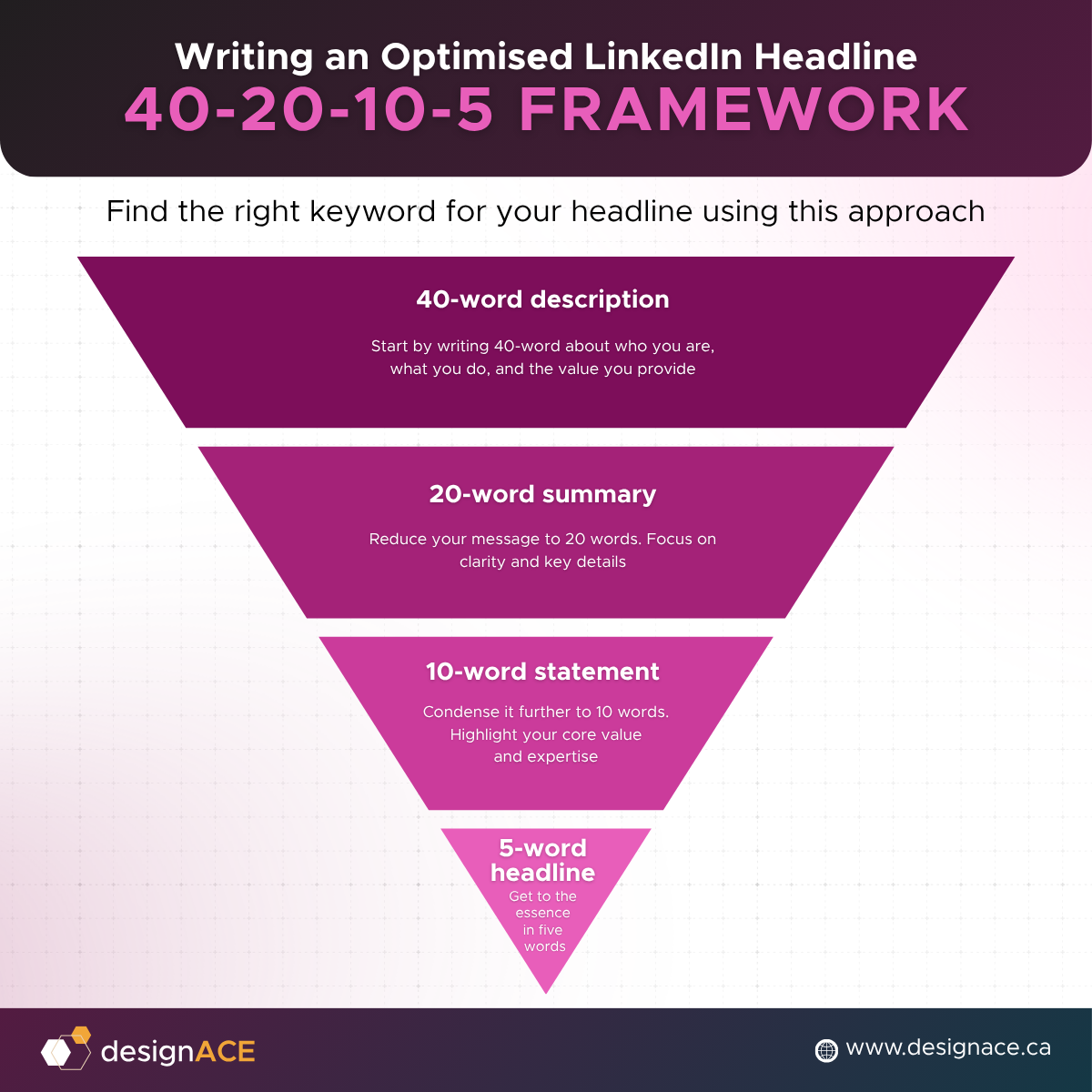
A Simple Framework for Writing a Better Headline
If you're struggling to summarise your expertise, try simplifying before you optimize.
Start by writing a 40-word description of who you are, what you do, and the value you provide. Don't worry about length at this stage—simply capture your ideas as naturally as possible. Then challenge yourself to rewrite that description in 20 words, followed by 10 words, and finally just five.
Each revision forces you to remove unnecessary language while keeping the most important ideas. By the time you've reached the final version, you'll often uncover the strongest words, phrases, and themes that deserve a place in your LinkedIn headline.
From there, use those strong keywords to write a compelling headline that hooks your audience and will spark curiosity. Under 220 characters, you can then tell your clear value proposition.
To make your LinkedIn headline work harder for you, think of it in two parts.

Hook + Proof Framework: A Framework for attention-grabbing LinkedIn Headline.
The first part is your first impression. The opening 60–70 characters are typically what people see in search results, comments, and connection requests. Use this space to clearly communicate who you are, what you do, or the value you provide so that people immediately understand why they should click on your profile.
The second part is where you add context. Use the remaining characters to reinforce your expertise with relevant keywords, industry specializations, credentials, or a concise value proposition. This not only gives visitors a better understanding of your professional brand but also helps LinkedIn associate your profile with relevant searches.
Design a LinkedIn Banner That Reinforces Your Brand

Design a LinkedIn Banner That Reinforces Your Brand
Your LinkedIn banner is one of the largest visual elements on your profile, yet it's often one of the most overlooked. While your profile photo introduces you, your banner reinforces what you do, what you stand for, and why someone should continue exploring your profile. Together, they create a stronger first impression before a visitor reads a single word.
Unlike a generic background image, a well-designed banner communicates your professional identity at a glance. It can showcase your brand colours, highlight your expertise, reinforce your value proposition, or subtly reflect the industry you serve. A thoughtful banner helps visitors recognise that you've intentionally built your professional brand rather than simply completed
Why Banners Matter
Your banner acts as visual branding for your LinkedIn profile. Research consistently shows that people form first impressions within seconds, making visual cues just as influential as written content. On average, human attention is only 8 seconds, shorter than that of a goldfish. A clean, intentional banner signals professionalism and helps establish credibility before someone scrolls through your experience or About section.
For business owners, consultants, and professionals building a personal brand, your banner also creates consistency across your online presence. When your website, social media, and LinkedIn profile share similar colours, messaging, and visual identity, people are more likely to remember your brand and recognise it across different platforms.
What Makes an Effective Banner
An effective LinkedIn banner doesn't need to be complicated, but it should be purposeful. Choose colours that reflect your personal or company brand rather than blending into LinkedIn itself. Because LinkedIn's interface already uses blue extensively, selecting complementary colours can help your profile stand out while maintaining a professional appearance.
Your banner should also reinforce your positioning. This could include a concise value statement, your area of expertise, your company branding, or imagery that reflects your work. Avoid cluttering the design with excessive text or multiple competing messages. A simple, visually balanced banner is often far more memorable than one trying to communicate everything at once.
You don't need advanced design skills to create a professional banner. Platforms like Canva offer LinkedIn banner templates that are easy to customise, making it possible to create a polished design in just a few minutes. If you're unsure where to start, we've also created a free LinkedIn banner template to help you build a profile that's both professional and memorable.
See page 3 of our free LinkedIn Playbook Series 1: Profile Power-Up to learn more about how to stand out using your banner.
Choose a Professional LinkedIn Profile Photo

Choose a Professional LinkedIn Profile Photo
Your profile photo is often the first thing people notice when they come across your LinkedIn profile. It appears in search results, connection requests, comments, direct messages, and your profile itself, making it one of the most recognisable parts of your professional identity. A high-quality headshot helps build trust and makes your profile feel approachable before anyone reads your headline or About section.
Fortunately, creating a professional LinkedIn profile photo doesn't require an expensive photoshoot. In most cases, good lighting, appropriate clothing, and a clean background are enough to create a strong first impression that reflects confidence and credibility.
What Makes a Great Headshot
The best LinkedIn profile photos feel authentic and approachable. A genuine smile can make you appear more welcoming and easier to connect with, while natural lighting helps create a clear, polished image. If possible, take your photo near a window or in soft outdoor light to avoid harsh shadows and unflattering overhead lighting.
Your clothing should match the level of professionalism your audience expects. Think about what you would wear to meet an important client, attend a networking event, or deliver a presentation. The goal isn't to look overly formal, it’s to present yourself in a way that's consistent with your personal brand and industry.
A simple, uncluttered background keeps the attention where it belongs: on you. Whether it's a neutral wall, an office setting, or a softly blurred outdoor backdrop, the focus should remain on your face rather than competing visual elements.
What to Avoid
Not every good photo belongs on LinkedIn. Casual selfies, holiday snapshots, cropped group photos, or pictures with distracting backgrounds can unintentionally undermine your professional image. While these photos may work well on personal social media platforms, LinkedIn serves a different purpose and should reflect how you want to be perceived professionally.
You also don't need to over-edit your image. Heavy filters, excessive retouching, or dramatic effects can make your profile feel less authentic. A clear, natural-looking photo that accurately represents you is far more effective than one that appears overly staged or artificial. Ultimately, people connect with people, and authenticity is one of the strongest first impressions you can make.
For more information, dos and don’ts, and a guide about what profile picture to use, go to page 4 of our free LinkedIn Playbook Series 1.
Write an About Section That Tells Your Story
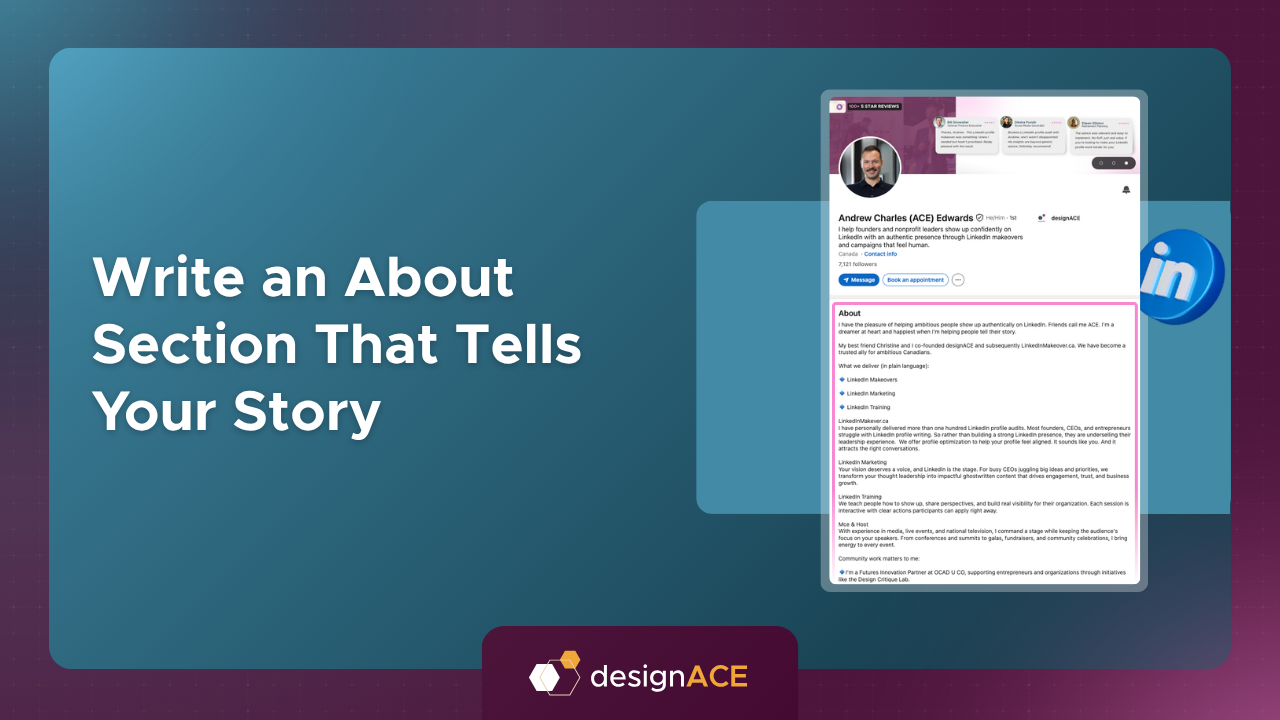
Write an About Section That Tells Your Story
If your LinkedIn headline earns the click, your About section is what convinces someone to stay. This is your opportunity to explain who you are, what you do, and why someone should choose to work with you—all in your own voice. Rather than repeating your résumé, think of this section as the story behind your career and the value you bring to every opportunity.
LinkedIn gives you up to 2,600 characters for your About section, and it's worth using the space strategically. A complete, well-written profile not only helps visitors understand your expertise, but also provides LinkedIn with more context about your skills and specializations, improving your discoverability in search results.
Use Keywords Naturally
A strong About section balances readability with discoverability. Including relevant keywords helps LinkedIn understand what you do and increases the likelihood of your profile appearing in searches related to your expertise. For example, if you're a content marketer, UX designer, or financial advisor, those terms should appear naturally throughout your profile instead of being confined to your headline.
The goal isn't to repeat the same phrase as many times as possible. Instead, incorporate keywords where they genuinely fit while also mentioning related skills, industries, services, and areas of expertise. This approach supports LinkedIn SEO without making your profile feel repetitive or written solely for an algorithm.
Lead With Your Purpose
The first two sentences of your About section are often the only part people see before deciding whether to click "See more." That makes your opening one of the most important pieces of copy on your profile.
Lead with clarity by explaining why you're on LinkedIn and who you want to connect with. Whether you're looking to grow your business, collaborate with industry peers, attract new clients, or explore career opportunities, stating your purpose early helps readers understand how they can engage with you. A clear opening also encourages the right people to continue reading.
Tell a Story, Not Your Résumé
Your experience section already outlines where you've worked and the positions you've held. The About section should answer a different question: What has your professional journey taught you, and how does that shape the way you help others today?
Rather than listing responsibilities or achievements, share the experiences that have influenced your career, the values that guide your work, and the problems you're passionate about solving. Stories are naturally more memorable than job titles because they provide context and help readers connect with the person behind the profile.
For business owners, this could include why you started your company or the challenges that inspired your work. For professionals, it may be the lessons you've learned throughout your career or the expertise you've developed over time. Either way, the objective is to create a narrative that builds credibility while remaining authentic.
Add Personality Without Losing Professionalism
People connect with people, not polished corporate biographies. Including a small personal element can make your profile more approachable and memorable without compromising your professionalism.
You might briefly mention a hobby, a volunteer role, an interest outside work, or something that reflects your personality. These details often become natural conversation starters and help create common ground with potential clients, collaborators, or employers. Keep the focus on your professional identity, but don't be afraid to show there's a real person behind the profile.
Make It Easy to Read
Even the strongest story can lose its impact if it's difficult to read. Large blocks of uninterrupted text often discourage visitors from engaging with your profile, particularly on mobile devices where readability matters even more.
Break longer sections into shorter paragraphs and use bullet points where appropriate to highlight key strengths, services, or achievements. You can also use emojis sparingly as visual markers to improve scannability, provided they align with your personal brand and industry. A clean, well-structured About section makes it easier for both people and LinkedIn to understand your story.
We have some great examples of what a good ‘About’ section looks like. Head to page 5 of our free LinkedIn Playbook Series 1.
Make Your LinkedIn Profile More Credible With Featured Content and Recommendations

Make Your LinkedIn Profile More Credible With Featured Content and Recommendations
A strong LinkedIn profile isn't built on words alone. Supporting your experience with examples of your work and recommendations from others helps reinforce your credibility and gives visitors greater confidence in your expertise. These sections act as proof that your skills extend beyond what you've written about yourself.
Whether you're a consultant, entrepreneur, executive, or job seeker, showcasing evidence of your work makes your profile more persuasive and memorable. Instead of simply claiming experience, you're giving people something tangible they can explore.
Use the Featured Section Strategically
The Featured section is one of LinkedIn's most valuable but underused profile features. It allows you to highlight content you want every visitor to see first, making it an ideal place to showcase your best work.
Rather than leaving this section empty, feature resources that demonstrate your expertise and provide value to your audience. Depending on your profession, this could include published articles, case studies, presentations, podcasts, interviews, newsletters, or thought leadership content. Select items that support the professional image you want to project and reinforce the goals you've set for your LinkedIn presence.
Add Rich Media to Your Experience
Your experience section doesn't have to consist solely of text. LinkedIn allows you to attach media such as portfolios, videos, presentations, project summaries, certifications, and external links that bring your work to life.
Adding visual examples gives visitors a better understanding of your capabilities and helps break up text-heavy sections of your profile. For example, marketers can showcase campaigns, designers can display portfolios, consultants can feature presentations, and business owners can highlight customer success stories or speaking engagements. Rich media adds depth and creates a more engaging profile experience.
Why LinkedIn Recommendations Matter
Recommendations provide something your own profile can't: independent validation. They offer social proof by allowing colleagues, clients, managers, and collaborators to describe the value they've experienced working with you.
If you don't already have recommendations, don't wait for them to appear organically. Reach out to people you've worked with, explain what you're hoping to highlight, and provide a few talking points to make the process easier. Many people are happy to write a recommendation when they're given a little guidance.
A great way to start the conversation is by offering a recommendation first. Not only is it a thoughtful way to recognise someone else's work, but it often encourages them to return the favour. Over time, a collection of authentic recommendations can significantly strengthen your credibility and help reinforce the expertise you've worked hard to build.
Learn From Great LinkedIn Profiles Without Copying Them

Learn From Great LinkedIn Profiles Without Copying Them
One of the fastest ways to improve your LinkedIn profile is to study professionals who consistently make a strong first impression. Rather than copying someone else's profile word for word, look for the patterns that make their profiles effective and consider how those principles could be adapted to reflect your own experience and personal brand.
The goal isn't to imitate another professional's voice or positioning. Instead, identify the elements that create clarity, credibility, and confidence, then apply those lessons in a way that feels authentic to you.
Strong Headlines Focus on Value
High-performing LinkedIn profiles rarely rely on a job title alone. Instead, they quickly communicate who the person helps, what they do, and the value they bring. Their headlines often combine relevant keywords with a concise value proposition that immediately tells visitors why they should learn more.
When reviewing other profiles, ask yourself whether you understand what that person does within a few seconds. If the answer is yes, consider how you can bring the same level of clarity to your own headline without simply borrowing their wording.
Effective Banners Reinforce Personal Branding
The strongest banners don't exist just to fill empty space—they support the story the profile is already telling. They typically use consistent colours, professional imagery, and messaging that aligns with the person's expertise, company, or industry.
As you browse LinkedIn, notice which banners naturally draw your attention and why. Is it the colour palette, the simplicity of the design, or the clarity of the message? Understanding these visual patterns can help you create a banner that's memorable while remaining true to your own brand.
Complete Profiles Build Greater Confidence
Profiles that stand out are usually complete. They include a thoughtful About section, detailed experience, featured content, recommendations, and supporting media that reinforce credibility. Every section contributes to a consistent professional story rather than leaving visitors with unanswered questions.
Instead of asking whether your profile looks "finished," ask whether it gives someone enough confidence to contact you. Every completed section reduces uncertainty and makes it easier for visitors to understand your expertise.
Rich Media Makes Experience More Tangible
Great profiles don't rely entirely on text to communicate expertise. They include presentations, articles, videos, case studies, portfolios, certifications, or project examples that allow visitors to see the quality of the work for themselves.
As you review other professionals' profiles, pay attention to how they showcase their achievements rather than simply describing them. Visual proof often strengthens credibility far more effectively than additional paragraphs of explanation.
Recommendations Reinforce Trust
Recommendations consistently appear on profiles that inspire confidence because they provide independent validation of a person's work. Reading how clients, colleagues, or managers describe someone's strengths often carries more weight than any self-written description.
Rather than comparing the number of recommendations someone has, look at the qualities those recommendations emphasise. They can provide useful insight into the types of strengths and expertise that others genuinely value—and remind you to actively build social proof on your own profile over time.
Quick Tips for Making Better Decisions With LinkedIn Analytics
Define a clear goal before updating your profile so every section supports the same objective.
Write a headline that communicates your value, not just your job title.
Design a branded LinkedIn banner that reinforces your expertise and makes your profile memorable.
Use a professional, well-lit headshot with a clean background and a friendly expression.
Complete your About section with a clear story, relevant keywords, and a touch of personality.
Showcase your best work using the Featured section and rich media throughout your experience.
Request recommendations from clients, colleagues, and collaborators to strengthen your credibility.
Review your profile regularly and update it as your experience, goals, and business evolve.
Before publishing changes, ask yourself one question: Would this profile make someone want to start a conversation with me?
Conclusion: Small Improvements Create Stronger First Impressions
Your LinkedIn profile is never truly finished—it should evolve alongside your career, business, and professional goals. Every improvement, whether it's refining your headline, updating your About section, adding featured content, or requesting a new recommendation, helps create a stronger first impression and makes it easier for the right people to discover and trust you.
You don't need to overhaul your entire profile overnight. Start with one section, make intentional improvements, and build from there. If you'd like personalized guidance, designACE offers a free LinkedIn profile audit where Andrew Charles Edwards, CEO and co-founder, will review your profile, provide a personalized scorecard, and share practical recommendations—including a free LinkedIn banner template—to help you strengthen your professional presence with confidence.
If you'd rather skip the trial and error, LinkedInMakeover.ca (powered by designACE) offers a done-for-you LinkedIn profile makeover tailored to your industry, career stage, and professional goals. Instead of simply rewriting your profile, we focus on clarifying your positioning, strengthening your messaging, and optimizing every section—from your headline and About section to your banner, featured content, and keywords—so your profile attracts the right conversations and opportunities. Because most people don't have a LinkedIn problem; they have a positioning problem.
Frequently Asked Questions (FAQs)
-
Your LinkedIn headline should do more than state your job title. It should clearly communicate what you do, who you help, and the value you provide, while naturally incorporating relevant keywords that improve your visibility in LinkedIn search results. A strong headline encourages people to click on your profile and learn more.
-
LinkedIn allows up to 2,600 characters for your About section, and it's worth using most of that space if it adds value. Focus on telling your professional story, highlighting your expertise, explaining who you help, and including relevant keywords naturally. Structure the content with short paragraphs or bullet points so it's easy to read on both desktop and mobile devices.
-
The easiest way to receive recommendations is to ask people you've genuinely worked with, such as colleagues, clients, managers, or business partners. Make the request as easy as possible by reminding them of projects you worked on together or suggesting a few areas they could mention. Offering to write a recommendation for someone else first is also a thoughtful way to start the conversation and often encourages them to return the favour.
-
Review your LinkedIn profile every few months or whenever there's a significant change in your career or business. Updating your headline, About section, featured content, recent projects, certifications, or recommendations helps ensure your profile stays accurate, reflects your current goals, and continues to represent your expertise effectively.
-
Absolutely. LinkedIn gives small businesses an opportunity to build credibility, showcase expertise, strengthen relationships, and connect directly with decision-makers. A well-optimised profile, combined with valuable content and consistent engagement, can help generate leads, attract partnerships, increase referrals, and create meaningful business opportunities over time.
Useful Blogs

LEVEL UP YOUR LINKEDIN PROFILE
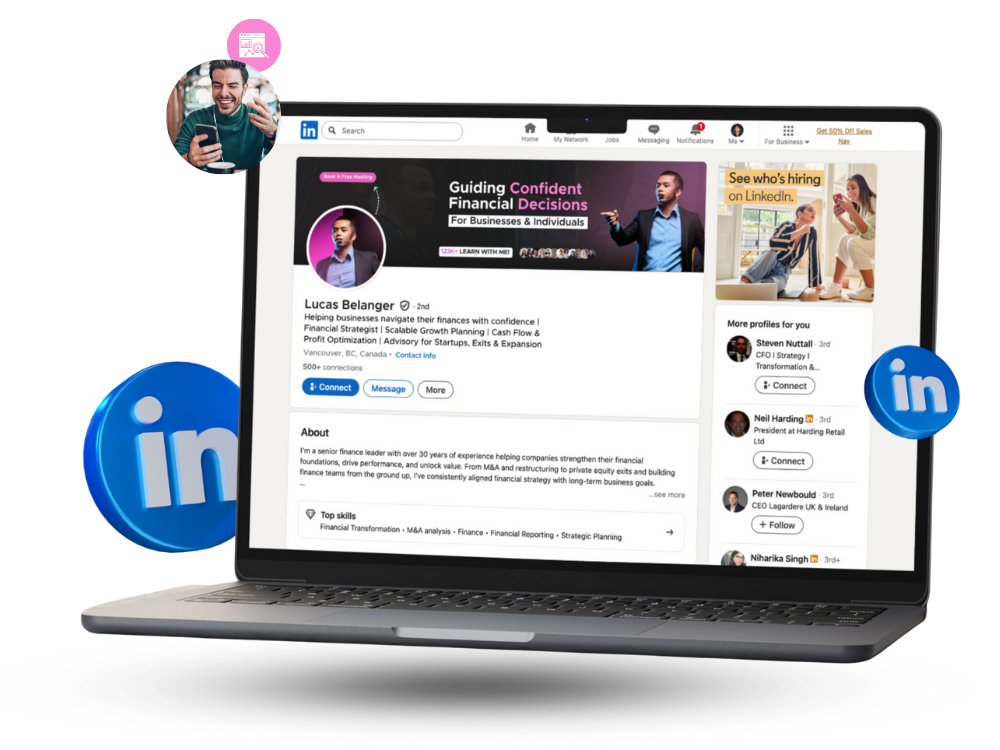
Enhance your LinkedIn presence and attract more opportunities with a profile designed to stand out.
PICK YOUR MAKEOVER
Learn how to build a standout LinkedIn profile as a new graduate by showcasing your skills, projects, education, and potential.